
Delphi Handbooks Collection


Delphi XE Handbook


Delphi 2010 Handbook


April 14, 2009

TObject is Online

The recent update of the RAD Studio 2009 Help provides full HTML-based navigation of Delphi help files. That's a significant step forward for the docs team at CodeGear.

The recent update of the RAD Studio 2009 Help (see Dee Elling blog post and the readme file by Kris Houser) provides full HTML-based navigation of Delphi help files. That's a significant step forward for the docs team at CodeGear.

If you jump to the docs home page for RAD Studio, at http://docs.embarcadero.com/products/rad_studio/ you can pick the various documents in various formats, but what is new (or at least seems to work much better) is the ability to refer to individual classes and individual methods of those classes with a specific URL, so that you can bookmark online help pages and post links to any of them. For example, the list of TObject's methods (show below) is available at the following page within the delphivclwin32 guide: !!MEMBERTYPE_Methods_System__TObject.html.
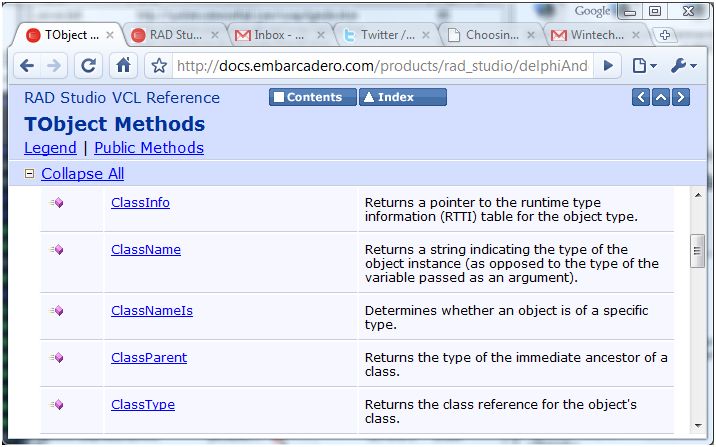
If you select one of the methods, say ClassParent, the URL of the page becomes: System__TObject__ClassParent.html which is composed by the unit name, the class name, and the method name.

Now the full URL is very long (http://docs.embarcadero.com/products/rad_studio/delphiAndcpp2009/HelpUpdate2/EN/html/delphivclwin32/System__TObject__ClassParent.html), so we'll all have to use URL shortening services or come up with a specific proxi redirecting to the delphi docs. Also, some of the summary pages are not the best choice (the content page shows a list of units, while I could not find a list of classes, much more useful for me). Summary pages seem also very slow, while individual pages are somewhat faster.

There is still work to do (like letting people contribute to help pages), but this is a significative step in the right direction. Kudos to the docs team at CodeGear.


6 Comments

TObject is Online 

 Imho there should be an option that lets you chose if
you want [F1] connected to that online site or to the
offline Help 2 files.

I would rather select the online option, but sometimes
you are traveling, have a darn slow connection or are
offline for what ever reason.

Anyway, a search function is definitely need. Did you
try to load the index or contents pages?

http://docs.embarcadero.com/products/rad_studio/delphiAndcpp2009/HelpUpdate2/EN/html/delphivclwin32/contents.html

That feels extremely sluggish here - and I am
currently using an 8 Mbit connection in the US...
Comment by Olaf Monien [http://www.monien.net/blog] on April 14, 18:18

TObject is Online 

AFAIK docs are made with the excelent Doc-O-Matic
(http://www.doc-o-matic.com/).
Maybe frames would be great ala MSDN and make some
manual tweak to make the Content more ajaxian to load
faster.
There is a feedback link I hope docs people read.
Certainly a big step forward.
OTA docs still mising  :(
Comment by Daniel Luyo on April 14, 18:56

TObject is Online 

 I've setup a custom google search at

http://www.google.com/coop/cse?cx=017050047961768264594:kzrri3fitdw

Right now it also includes the online Jedi help files.
Comment by Iman on April 14, 18:58

TObject is Online 

Now we have tons of information: pdf, chm, html, web
access, MSDocExplorer......etc. pp.

But the situation is horrible like before. I am not
able to find things in reasonable time. Up to now the
good old Delphi 7 Help file is the fastest way to get
information. Sad, sad,....

I know, the old .hlp file support is gone in Vista+,
but Codegear, please have a look at QT. They have a
own very quick Help explorer. As fast as Delphi 7 Help.

Comment by Peter on April 14, 19:17

TObject is Online 

Good point about the URLs, and splendid blog post 
title. 
Comment by Tor on April 15, 10:03

Vista and the end of a common help system 

One of the worst things Microsoft made in Vista is 
the end of a common help system for Windows 
applications. WinHelp didn't allowed for 
great "styling", but was standard, fast, compact and 
easy to write and read - but it didn't have 
the "magic" HTML/CSS/JavaScript words within. 
Now we are going to have several different help 
systems each with its own interface and workings - 
back to the old MS-DOS days when each application 
used its own system - great!
The very useful help tooltips (click the question 
mark, click an item and a context-sensitive help is 
displayed - what was wrong with it?) are gone - press 
F1 and a page written to try to teach a squirell (or 
by a squirrel?) how to use the current tool is 
displayed. I wonder how these silly decisions could 
be approved - ah - but they've got the Wizard of 
Ozzie, the one who designed one of the applications 
with the WORST interface, Lotus Notes...
Comment by Luigi D. Sandon on April 16, 12:34


Post Your Comment

Click here for posting your feedback to this blog.

There are currently 0 pending (unapproved) messages.