January 31, 2009
On my Windows XP computer Microsoft is suggesting me a very odd update... which is in fact a brand new installation of 248 MB!
On my Windows XP computer, Microsoft automatic updates suggested me to do a brand new installation of .NET Framework 3.5. I checked and the last version of .NET I have on this computer is 2.0. So Microsoft is trying to make me install a brand new version of their library hiding it as an update. It certainly containes "many new features built incrementally upon .NET Framework 2.0" , as the description suggest...
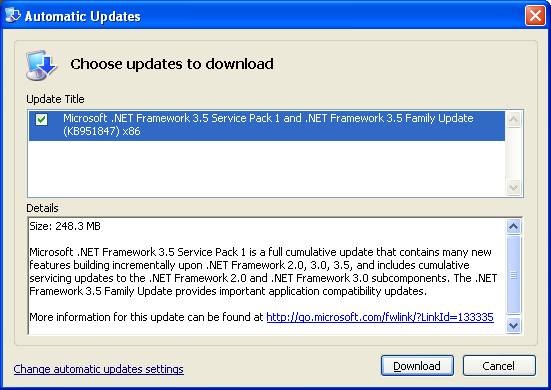
Oh, by the way, in case I had automatic updates (I hear them saying, "you need automatic updates for real security") I wouldn't have even noticed... I think this hidden installation goes very close to the border of Microsoft antitrust regulations. It clearly puts Microsoft at a big advantage over Java (and even Flash) because it can push its library updates, including Silverlight support, along with the operating system. More or less like they used to do with the browser. Needless to say, I didn't appreciate and cancelled the huge download.
posted by
marcocantu @ 2:15AM | 8 Comments
[0 Pending]
8 Comments
.NET Update or Automatic Installation?
For better or worse, Java also pulls automatic
updates. None of these are as bad as Apple Quicktime
and Adobe Acrobat, which keep trying to install
entirely unrelated software.
Comment by Craig Stuntz
[http://blogs.teamb.com/craigstuntz/]
on January 31, 05:15
.NET Update or Automatic Installation?
The very first thing I do when I install or re-install
Windows XP is disable Automatic Updates - I prefer to
control what gets installed on my computers when.

As a beneficial side-effect, I get to avoid some of
Microsoft's more questionable "updates" (e.g. Windows
Genuine Notification and this .NET), and if Patch
Tuesday creates problems I can hold off...

Downsides? None if you have a current firewall and
anti-malware.
Comment by M J Marshall
[http://www.kingstairs.com]
on January 31, 08:28
.NET Update or Automatic Installation?
About antitrust... the updates you cited (both .NET
and Silverlight) I think are not high priority but
facultative, so you have to explicitly ask for them
to be installed (at least, this is the behaviour for
me, maybe some non-default configuration of automatic
updates is required).
What I find annoying is that if you don't configure
properly automatic updates it decides for you when
it's time to update and then when is time to restart
your pc also.. happened a couple of times that I left
my laptop with some files opened and then come back
finding that automatic updates decided to reboot.....
What I find absurd with automatic updates is that
each and every software these days (also the HP
driver of my very humble inkjet printer) installs its
own update services, that stay there running in you
pc doing nothing but eating resources checking if for
some remote reason there's an update to apply....
This is the reason why I stay away from software like
acrobat reader (I use foxy reader instead), and all
the apple software at all....
Comment by Roberto Icardi on January 31, 17:02
.NET Update or Automatic Installation?
I also have this automatic update but it can't be
install, an error is showing at the end, reversing
then to .NET2 that get corrupted during the process.
So i have to reinstall .NET2

No .NET 3.5 no Prism! So i can't install Prism.
Comment by RAP
[http://volvoxsoft.com]
on February 2, 01:24
.NET Update or Automatic Installation?
It's like Delphi: to get fixes you have to install
the latest release <G>.
Comment by Luigi D .Sandon
[http://www.sandon.it]
on February 2, 17:07
.NET Update or Automatic Installation?
Flash, browsers, anti-trust... Why not Adobe try to
make an OS? Then they'll have the rights to update it
with whatever they like. Or Opera? Opera OS?

The whole anti-trust ranting is lame IMO.
Comment by Julian
[]
on February 2, 20:51
.NET Update or Automatic Installation?
Even with automatic updates Silverlight isn't
automatically pushed down, it's under the Optional
Components category.  Did you see otherwise?

.NET 3.5 is an update to .NET 2.0, not a seperate
product.  To understand why you have to
understand .NET versioning.

3.5 SP1 installs Framework 2.0 SP2 and .NET 3.0 SP1,
which adds some methods and properties to the BCL
classes in v2.  3.5 also still uses the 2.0 CLR, so
again it's an update vs. an entire new beast and is a
completely different story than when going from 1.1
to 2.0.

At the end of the day the worst you can accuse .NET
3.5 SP1 of is having a name that even confuses most
developers as to what they are actually getting.

This is a product installing something that is
already on your machine, in the same product line.
This is *very* different than Apple's Quicktime Auto
Updater trying to install iTunes or Safari on your
machine automatically even if you just want
QuickTime.  Those are three different products, not
different versions of the same product.
Comment by Shawn Oster
[http://blog.enginefour.com]
on February 5, 05:05
.NET Update or Automatic Installation?
.NET 3.5 SP1 includes the latest service pack for .NET
2.0 -- .NET 2.0 SP3, if I recall correctly.
Furthermore, the only way Microsoft distributes .NET
2.0 SP3 is with the installer for .NET 3.5 SP1.

It makes sense that 3.5 SP1 would patch some bugs in
2.0, since 3.5 is just 2.0 plus a few extra DLLs. When
they find a bug in the 2.0 DLLs, they have to fix it,
and that affects the 2.0 on your machine. The absurd
part is that they don't distribute 2.0 SP3 on its own.
Comment by Joe White
[http://blog.excastle.com/]
on February 10, 22:10
Post Your Comment
Click
here for posting
your feedback to this blog.
There are currently 0 pending (unapproved) messages.